
dev log 3 - branding and login
2022-04-09
Lapse in logs, but I'm back!
Branding
I'm not fully settled on the look and feel of this site just yet, but I spent some time working on a 'branding' page, to have quick access to the color values (as hex) I've currently defined for the theme for the site and such.
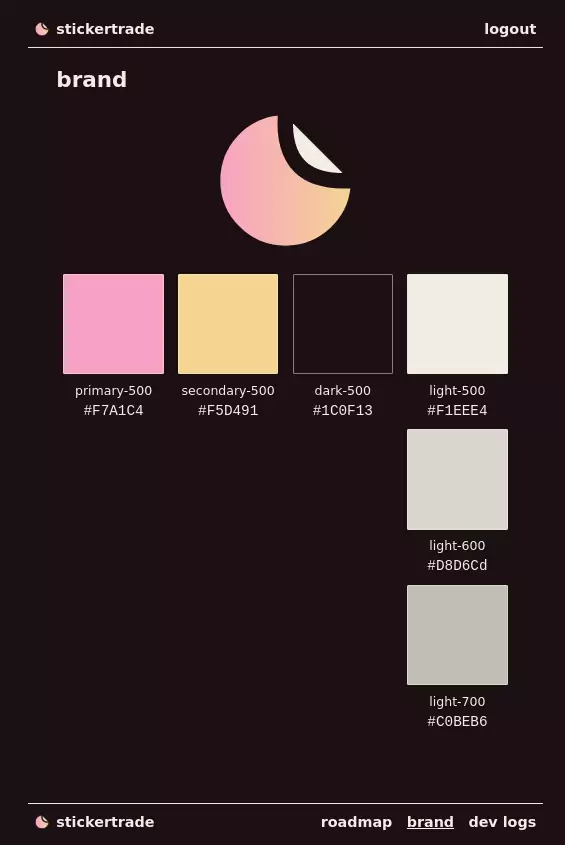
Noticeable above:
- I've added a footer to the site, and moved all of the old random sub-pages to it.
- The new header is just homepage link and login / logout buttons), more on that found below.
- (yet another placeholder thing likely) a logo!

Logo is a hand-edited SVG (that's actually just the sites favicon), which uses the brand colors, and is meant to look like a partially peeled sticker with the white on its top right.
Login
Basic login has been built.
Stolen mostly from the Remix example 'Jokes' app, we've got basic bcrypt-validated session-based authentication working.
No registration yet, hence users are still only just populated by seeding the database, and the only schema change was to add a passwordHash attribute to the Users table.
Form Validation
Remix has very decent examples of how you can do form validation, but as someone who is a large fan of the level of abstraction offered by frameworks like react-hook-form, I wanted something similar to this within Remix, and it exists!
Remix Validated Form is pretty much exactly what I was looking for.
I had heard good things about Zod, which the above perfectly integrates with:
export const validator = withZod(
  z.object({
    username: z
      .string()
      .nonempty("Username is required")
      .min(3, { message: "Username must be at least 3 characters" }),
    password: z
      .string()
      .nonempty("Password is required")
      .min(6, { message: "Password must be at least 6 characters" }),
  })
);
The above defines a 'validator' that can run on serverside and clientside, that basically encapsulates all of the logic for validation for me (you can also use methods within Zod to introspect validators to get TypeScript type definitions from them, since it is TypeScript-first library).
export const action: ActionFunction = async ({ request }) => {
  const { formId, data, error } = await validator.validate(
    await request.formData()
  );

  if (error) return validationError(error);

  const { username, password } = data;

  const user = await login({ username, password });

  if (!user) {
    return validationError(
      {
        fieldErrors: {
          password: "Login failed",
        },
        formId: formId,
      },
      data
    );
  }

  return createUserSession(user.id, "/");
};
I then define an 'action' function, which is basically something the clientside will POST to when it wants to actually submit its data, and I use the validator to fetch data from the form body of the POST request to then invoke login (login being something internal that returns user metadata if the username / password combo is correct).
If I don't get an user back from login, the actions errors on the password field.
But if we do get a user back, a user session is created (more internal plumbing that sets a cookie and then returns a redirection status code).
export default function Index() {
  return (
    <main className="max-w-sm mx-auto">
      <ValidatedForm validator={validator} method="post">
        <FormInput name="username" label="Username" />
        <FormInput name="password" label="Password" type="password" />
        <SubmitButton
          className="mt-3"
          submit="Login"
          submitting="Logging in..."
        />
      </ValidatedForm>
    </main>
  );
}
The smallest bit of code is the actual JSX, partially due to the inputs and submit button being mostly defined and styled elsewhere (but still within my project so I have full control over them, very headless).
This feels clean, like most of Remix so far.